MedAlert · iOS + Android

Never miss a dose. Never wonder if they did.

MedAlert reminds you at the right time, records each dose with one tap, and shows the people who care about you that everything is okay. Reminders work even without internet.

Download on the App Store Get it on Google Play
Free to start, no account needed Works offline 11 languages
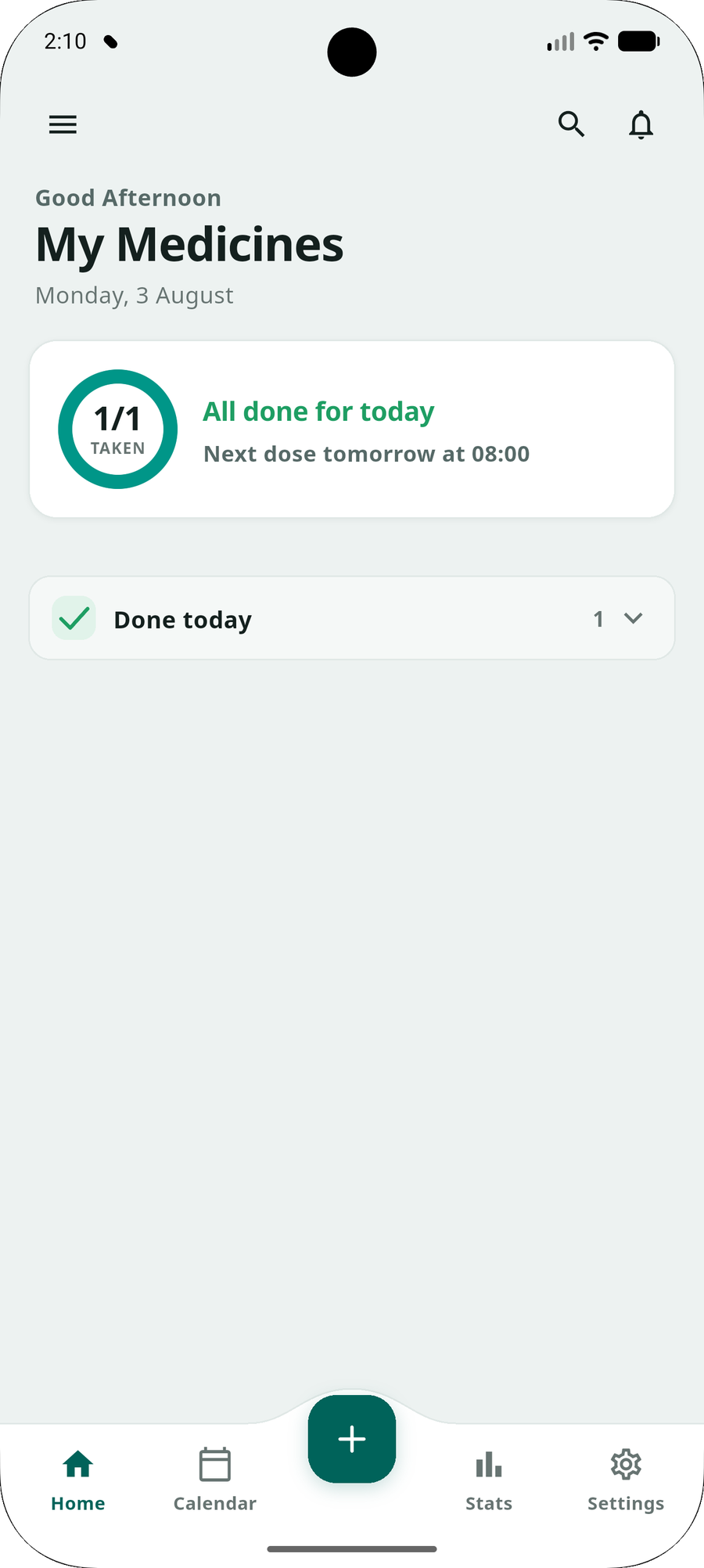
MedAlert home screen on a phone. Heading My Medicines, Monday 3 August. A card reads 1 of 1 taken, all done for today, next dose tomorrow at 08:00, followed by a Done today row.

Who it's for

Two reasons people install MedAlert

For yourself

  • Reminders that ring on time, even after a restart or in battery saving mode
  • Mark taken, snooze or skip right from the notification, without opening the app
  • "Did I take it?" answered on the home screen: taken today, and the last time
  • Doctor changed the dose? Set it from a chosen day, and your history keeps both

For someone you care for

  • See from another city that your mother took her morning dose
  • Get told about a missed dose or a medicine running low
  • Fully manage medicines for a person who has no smartphone
  • See who changed a dose and when, in a plain change list

How it works

Three steps, then it runs itself

Step 1

Add your medicines

Any real schedule works: fixed times, every N hours, cycles like 21 days on and 7 off, or as needed. Doses, forms, colors, food rules and supply tracking included.

Step 2

Get gentle reminders

Quiet hours at night, a repeat if you don't answer, and a nudge to eat first when a pill is taken after food. Reminders live on the phone itself, so they work with no internet and with the app closed.

Step 3

See the picture

History, adherence and a monthly calendar answer "when did I stop taking it" precisely. Share it with family, or export a PDF for your doctor.

Care Circles

The part that makes MedAlert different

A circle is the people around one patient: family, a caregiver, a doctor. Everyone sees the same picture, each with their own role. One circle is always one person, so nothing ever gets mixed up.

If they use their own phone

They get their reminders and mark doses themselves. You see how they are doing, and if a dose slips, you can send a gentle reminder with one tap: "your daughter reminds you about the morning pill". They stay in charge of their own treatment.

If they have no smartphone

You run their profile from your phone: medicines, schedules, marking doses, pausing for a hospital stay. Grandmother needs no device at all, and the whole family still sees one honest record.

Two rules we never break
1No one marks a dose for a person who uses their own phone. Family can remind, not decide. Otherwise the record stops being a record of what really happened.
2No one edits their schedule remotely. If a person uses their own phone, their medicines change only on their phone. They learn about a change in their treatment from a person, not from the app.

Five roles, one access log

Each member joins with a role that defines exactly what they can see and do. The patient sees who is in their circle, every action is written to an access log they can read, and they can leave at any moment without asking anyone.

OwnerCaregiverDoctorViewerPatient

The person who cares pays for Premium. The person being cared for pays nothing.

Trust & privacy

A medicine list is a diagnosis. We treat it that way.

Offline first

Everything is saved on the phone first. A dose mark can never be lost to bad signal: you see it instantly, and it syncs when the network returns.

Locked, twice

The app closes behind its own PIN or Face ID, separately from the phone. Sign-in supports two-factor codes, and you can end sessions on any device remotely.

Yours, visibly

Who in your circle saw or changed your data is written in a journal you can open. Delete your account in the app, with 30 days to change your mind. No ads, no data selling, and the app never asks for your location or your contact list.

Pricing

Free is not a demo

Free

Everything one person needs

Not a trial: use it as long as you like

  • A few medicines and dose times (the app shows the limit)
  • Full reminders: quiet hours, sounds, repeats, snooze
  • History, streaks, basic statistics
  • Supply tracking and refill alerts
  • Sync, widgets, app lock, two-factor sign-in
  • Join a family circle as the patient
Plus

No limits, for yourself

Monthly or yearly

  • Unlimited medicines and dose times
  • Monthly calendar
  • 90-day statistics and yearly trends
  • PDF report for the doctor
  • Automatic daily backup, custom colours
Premium

For the whole family

Monthly or yearly

  • Everything in Plus
  • Care Circles: invite family, caregivers and doctors
  • Look after someone who has no smartphone
  • Alerts about missed doses and medicines running low
  • Change list: who changed what, and when

Subscriptions are bought and managed in the App Store or Google Play. The patient in a circle never pays: the person who cares pays for Premium.

Questions

Asked before installing

Does it work without internet?

Yes, completely. Reminders are scheduled inside the phone itself, not sent from a server. In a plane, in the metro, in a village with no signal, the reminder still rings and the dose mark is saved. The network is only needed to share data with family and other devices.

Do I need an account?

No. The app works right away: add a medicine and get the first reminder without telling us anything. An account matters later, when you want your data to survive a lost phone or to share it with family. Everything you added moves into the account with you.

Can my daughter see my doses?

Only if you invite her into your circle, or ask her to keep an eye on you from the Care tab. You always see who is in it, every look and change is written to an access log you can read, and you can leave the circle at any moment without asking anyone.

Can family mark doses for me?

Not if you use your own phone. That is a rule, not a setting: your record stays a record of what you really did. Family can send a gentle reminder, and you mark the dose yourself.

My mother has no smartphone. Does this still help?

Yes. You create a profile for her inside your circle and run everything from your phone: medicines, schedules, marks, pauses for a hospital stay. She needs no device, and the whole family sees the same picture.

Will it ring when the phone is on Do Not Disturb?

On Android, yes: dose reminders are sent as alarms, which Do Not Disturb lets through by default, and you can switch this off. On iPhone, reminders are time-sensitive notifications: they usually break through Focus modes, but not the silent switch.

My doctor changed my dose. Do I lose my history?

No. Choose "Doctor changed the dose", pick the day it starts and set the new dose. Earlier days keep the dose you really took, and the report for your doctor shows both periods.

Is MedAlert a medical device?

No. MedAlert reminds and records. It does not diagnose, prescribe, calculate or adjust doses, or check drug compatibility. What to take and when is decided by your doctor. The report the app builds is a self-report, and it says so on the document. See our medical disclaimer.


Free on iOS and Android

Start with tonight's dose.

Two minutes to set up. No account needed.

Download on the App Store Get it on Google Play